

Greetings everyone. You might have spotted my unboxing post, which I made a bit before the Legion Go! Event and I promised a review, so here it is!
Link to the unboxing video.
Link to the unboxing video forum post
But first, a little introduction to who I am!
My name is Mikael, I'm from cold Finland and work in mobile games.
I've been an avid gamer my whole life; during my more active gaming years, I competed in Overwatch, PUBG, Counter-Strike, and so on.
Since hardware, software, and such are fairly "tied into" gaming, I've been building computers and messing around with them my whole life.
My journey with games started with my mother's ThinkPad around 2006, when I played Runescape and HOMM3 with my older brother.
But yeah, that's enough about me, and it is time to move forward to the Lenovo Go itself!
Legion Go!
I was looking into the handheld market and noticed the Lenovo Go! during the summer while browsing some Reddit articles regarding Steam Deck tweaks and stuff.
I've owned Steam Deck for a year or so; my normal use case for the device has been playing Playstation 2 games on an emulator and occasionally some Vampire Survivors and Control (Great game btw, I heavily recommend).
My biggest troubles with the Steam Deck have been how you are supposed to hold it in your hand, screen size, and having only one single USB-C port. I would not want to be forced to purchase a 50-100€ dock so I can link my keyboard, mouse, and/or even a monitor/TV to the device while charging it. With Legion Go! I can get a cheap USB-C hub to do all of this.
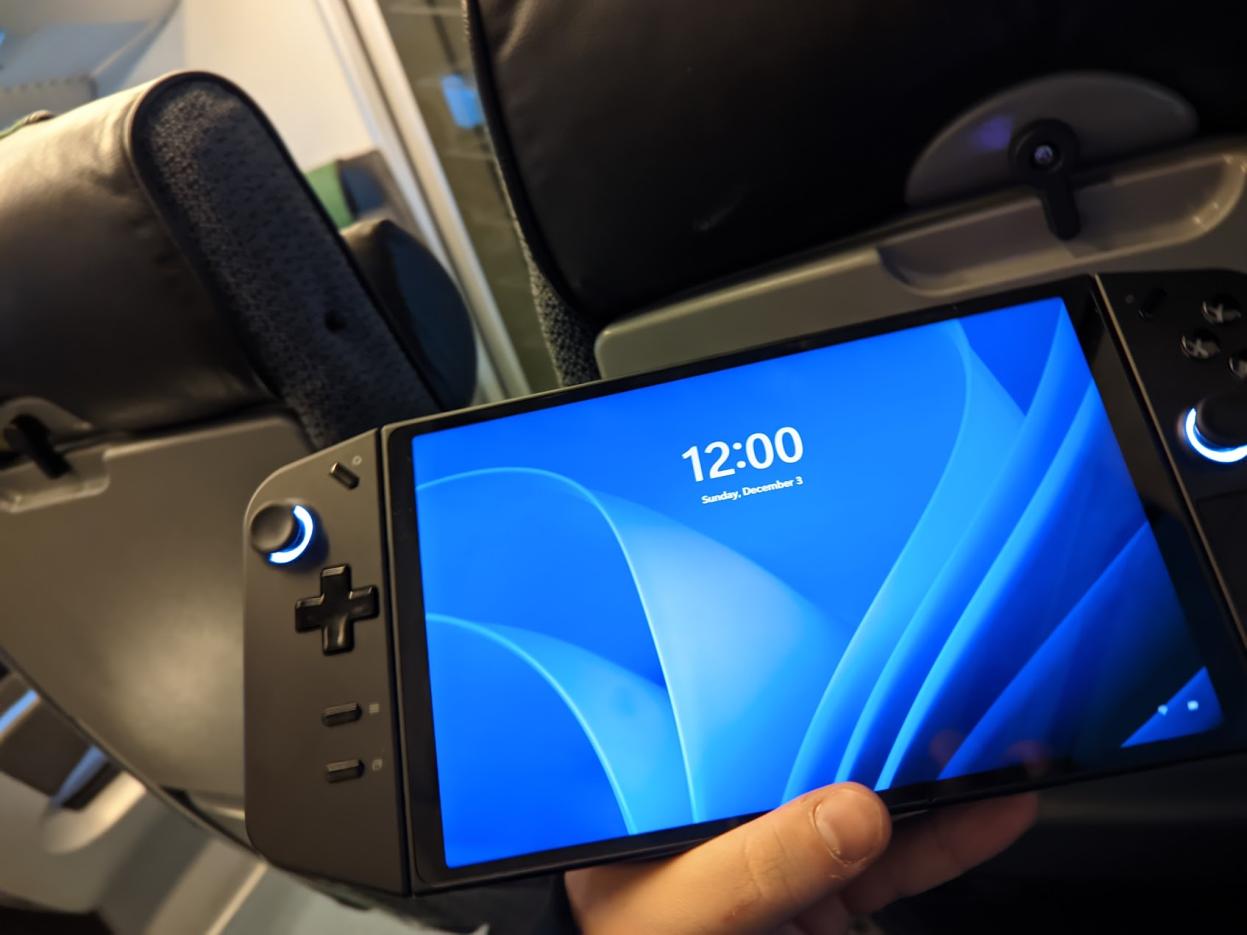
Just a disclaimer: I received the Legion Go! device since I was given an opportunity to join the #itsgotime event in Milan. So, the device(s) mentioned in this review have been given to me by Lenovo itself.
What was I most excited about Legion Go?
1. In-built stand
2. Detachable controllers
3. 2x USB-C ports
4. Larger screen than competitors & 144hz and better hardware
What I was mostly worried about with Legion Go?
1. Battery life
2. Not being able to utilize the 144hz display
3. Software (Firmware updates, Windows 11 tweaks and such)
4. Game support compared to Steam Deck
5. Lack of VRR support
Was I disappointed with Legion Go?
Definitely not; it delivers what you expect for a small handheld "console," but it requires some tweaking. The fanbase of this kind of product is awesome, and you can find millions of videos on how to do all the needed tweaks!
But then, let's get more in-depth with the review and my first experience with the device.
Out-of-the-box experience:
Just a reminder: since the system is based on Windows, it means that the product I've got (pre-production) will have a massive difference to a product you perhaps buy at the end of this year or in 2024. The performance of the device is dependent on which drivers, firmware, and BIOS you are using.
Mine had the first BIOS and Firmware of the device; I got the latest updates around a week after having the device, which greatly improved the experience and performance.
Getting the device to work was pretty much plug-and-play; I'm not sure how much I need to send "respect" to the Lenovo people in Deutschland.
My main problems were that the language was set to German, and Microsoft hasn't made the job easy for you to get that changed.
Legion Space:
Legion Space is a pre-installed software on Legion Go! that is used to launch games and modify power usage; of course, you can change those bright joystick LEDs, too! The application was not great when I received the device, but it has significantly improved since then.
Would I use it constantly to open my games and stuff? Well, no. My typical use case for the application is to set the fan speed to maximum and change the TDP from max (30W) to power efficiency (10-15w), so I can save battery while playing less graphically heavy games.
Software & Firmware:
Firmware, software, and such are done through Legion Space, or that is what Lenovo would want to happen.
Since my device was pre-production, when I opened the device the first time, I had to download plenty of updates; Windows 11 likes its updates.
I spent around 2-3 hours purely updating the device, then messing around with GPU drivers to get them working for the device.
The situation is similar when looking at competitors (errr,,, Asus) when their devices came out, so we can expect the out of box experience will improve over time, same with all of the drivers and Lenovo-made software. It's part of AMD's "blood" to improve things over time, so I also expect that to happen with the Z1 Extreme chip.
Back to the physical things, the controllers & FPS Mode:
I like how the Legion Go! looks, but of course, it's bulky like all these handheld devices.
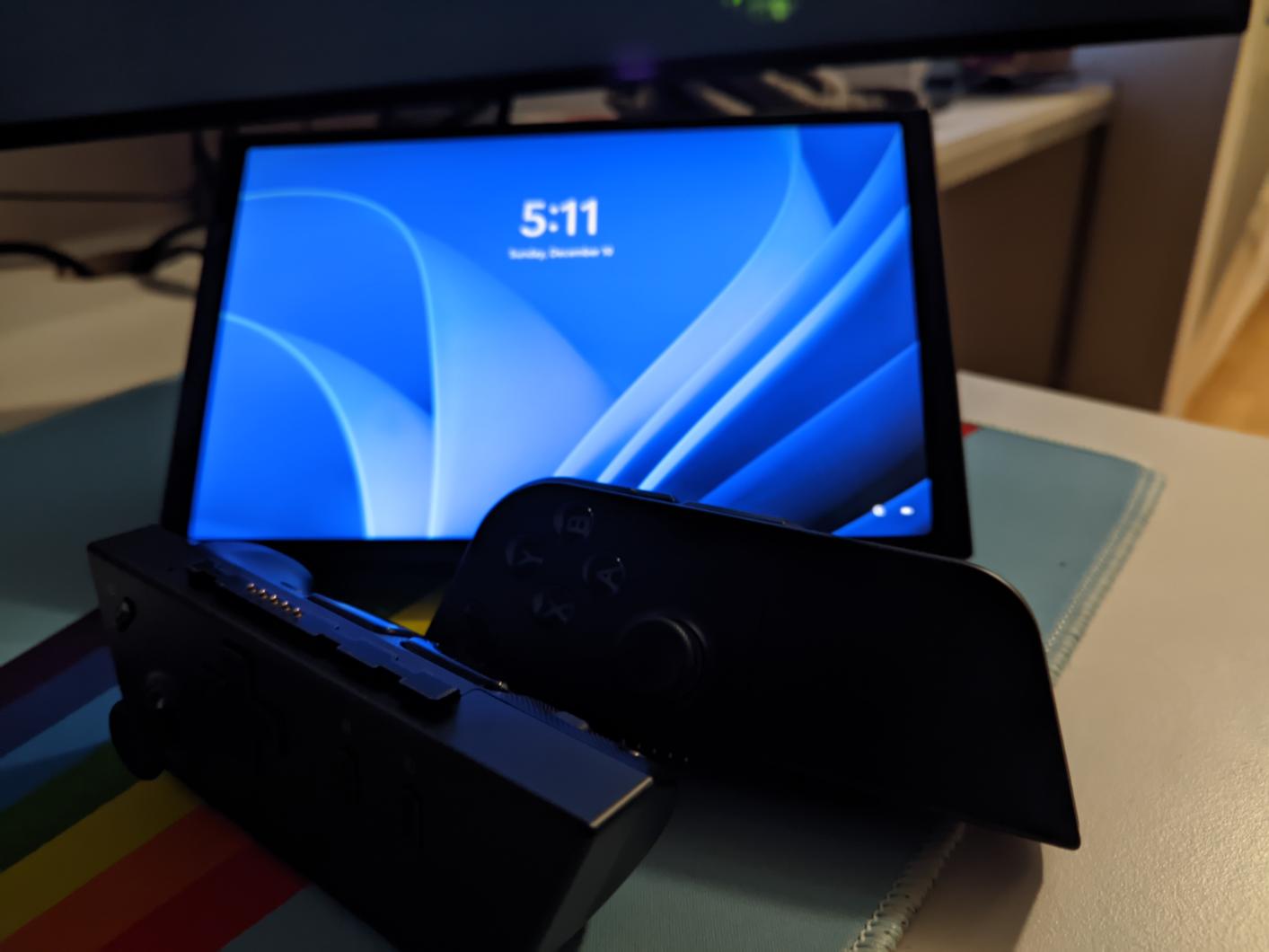
Detachable controllers are a great addition, but even though I have pretty "large" hands, they are a bit too bulky for my taste, and I would love to "tie them together" somehow; perhaps this is a possible "additional" sales product for Lenovo with co-operation with Microsoft (XBOX) ;)?
(If you have a 3D printer, this isn't a problem.)
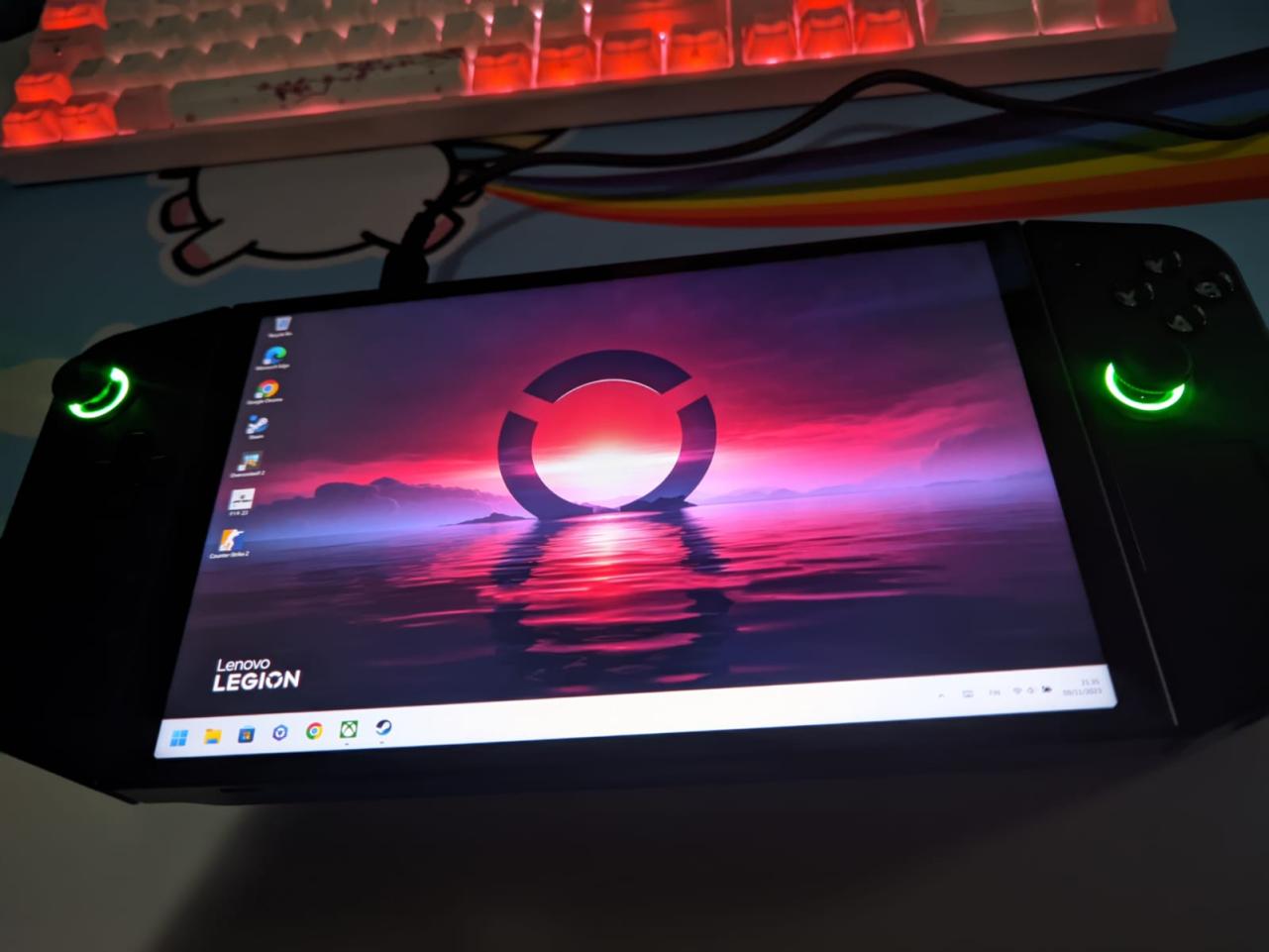
There are many additional buttons, just like in Steam Deck. They are in optimal positions for me personally; someone with smaller hands and shorter fingers can disagree. I love the layout of the buttons since they resemble the "XBOX" way instead of the "Playstation" model.
FPS Mode is a "well, that's cool" addition; I've not spent too much time with it yet, so I can't form an opinion. I tried it in some games, and my biggest problem was that the magnetic "plastic circle" did not lock "tight" enough to the controller, which caused problems when lifting the mouse.
This is not something I would purchase this device for, but it is not a negative thing to have.
Lately, I discovered I should be able to remove one of the "hats" from the FPS joystick; I have no idea how to do this without destroying the joystick itself. That could be improved or left out entirely. Please :(
Battery, display, and gameplay performance:
This is the most important and exciting topic for most of you: how does it do in games? Can you utilize the 1440p 144hz display at all?
Well, this is rough, but battery life is not great, which is expected; you can play F1 2023 for around 45-60 minutes straight, and then you need to plug in the charger. My experience is mainly in the custom 30W preset; using the performance (20W) mode can get more battery life.
This isn't Lenovo Go! problem, all of the Windows 11 devices share this matter. You can achieve notably better battery life on Linux, but as far as I know, there is no support from Lenovo for the Linux platform for this device.
Legion Go! has a fairly hefty battery compared to its closest competitor. Still, it also has a larger display, so remember to pack a battery bank or such for long travels without access to electricity!
The display itself is excellent, even though the 1440p is a challenge for this hardware; you can get the most out of the display by utilizing Radeon Super Resolution. With RSR, you are able to upscale your 1280x800 to 2560x1440, so you will have higher FPS, but of course, those small details can and probably will show up blurry.
You can enable RSR directly from the Legion Space settings (or the quick menu). After doing that, boot up your favorite game and set the resolution to 1280x800, and RSR will automatically scale your game to 1440p.
Tied up to FSR2, it should allow you to get higher FPS in your favorite games and enjoy them in upscaled 1440p resolution. I've unlocked the Integer scaling option, which requires registry editing, so I recommend doing this only if you are 100% sure what you are doing.
The display's colors were great out of the box, and I've not messed with them. Turning off the brightness adjustment setting from AMD Adrenalin settings will help if you notice a difference when using the device without a charger.
Gameplay performance is a good question. To get everything out of the device, you need to tweak the settings till you find what pleases you performance and graphical-wise. Most games work out of the box with no problem, and if you have a Wi-Fi connection, you can stream games from XBOX Game Pass Ultimate or with minimal power usage.
If you dislike the RSR 800p -> 1440p upscaling, trying 1200p resolution will probably work fine, but only expect a flawless experience without using upscaling.
So I recommend using RSR as much as possible tied up with FSR2; integer scaling is recommended to try, but forget this if you don't trust yourself messing around in the registry editor.
Tweaks: what do you need to do after receiving the device?
First, update everything that Legion Space and Windows offer; if you are more tech-savvy, look for a newer BIOS on the Lenovo Legion product support website.
During the time this review was written, there was no possibility of changing the VRAM amount from the software directly. If this is the case while you are reading this, I recommend you Google how to increase the VRAM amount from BIOS to 4 or 6 from the original 3. Sweetspot for the VRAM is 5-6, but 8 is too much for more RAM-demanding games.
Disable fullscreen optimization from each game's Windows properties if that damn setting automatically enables itself.
Of course, these minor tweaks are just the tip of the iceberg; if you are interested in how to get all of the performance out of your Legion Go, feel free to Google around and check our YouTube videos for more tweaks, but do your research first so you won't cause any headache if you mess something up.
TL;DR What is my opinion of the device? What kind of person would use and want this?
I like Legion Go! It has everything I missed in my previous handheld, bringing up many cool new features that will force competitors to return to the drawing table.
If you are a person who is looking for a perfect all-in-one device primarily for gaming but for entertainment or even work stuff, this is my suggestion. I would perhaps look for a more affordable device for purely handheld gaming (retro games and such).
The device itself delivers what is expected. Of course, we are at the beginning of all software side improvements, so that the device will improve a lot along its journey. The biggest problem is probably Windows 11, which still needs to recognize Legion Go! as a handheld device. Instead, it wants to believe this great device would be just a laptop, which can bring up some issues from time to time while playing games and doing your best utilizing the touch screen.
If you don't mind the early production problems, which can be resolved relatively "easily," and want a tremendous handheld device, I recommend getting a Legion Go.
Special thanks:
For you joining my written TED talk about Legion Go!
Lenovo Spazio Team
Legion Community Team, especially @DoctorEldritch !
Link to the unboxing video.
Link to the unboxing video forum post
But first, a little introduction to who I am!
My name is Mikael, I'm from cold Finland and work in mobile games.
I've been an avid gamer my whole life; during my more active gaming years, I competed in Overwatch, PUBG, Counter-Strike, and so on.
Since hardware, software, and such are fairly "tied into" gaming, I've been building computers and messing around with them my whole life.
My journey with games started with my mother's ThinkPad around 2006, when I played Runescape and HOMM3 with my older brother.
But yeah, that's enough about me, and it is time to move forward to the Lenovo Go itself!
Legion Go!
I was looking into the handheld market and noticed the Lenovo Go! during the summer while browsing some Reddit articles regarding Steam Deck tweaks and stuff.
I've owned Steam Deck for a year or so; my normal use case for the device has been playing Playstation 2 games on an emulator and occasionally some Vampire Survivors and Control (Great game btw, I heavily recommend).
My biggest troubles with the Steam Deck have been how you are supposed to hold it in your hand, screen size, and having only one single USB-C port. I would not want to be forced to purchase a 50-100€ dock so I can link my keyboard, mouse, and/or even a monitor/TV to the device while charging it. With Legion Go! I can get a cheap USB-C hub to do all of this.
Just a disclaimer: I received the Legion Go! device since I was given an opportunity to join the #itsgotime event in Milan. So, the device(s) mentioned in this review have been given to me by Lenovo itself.
What was I most excited about Legion Go?
1. In-built stand
2. Detachable controllers
3. 2x USB-C ports
4. Larger screen than competitors & 144hz and better hardware
What I was mostly worried about with Legion Go?
1. Battery life
2. Not being able to utilize the 144hz display
3. Software (Firmware updates, Windows 11 tweaks and such)
4. Game support compared to Steam Deck
5. Lack of VRR support
Was I disappointed with Legion Go?
Definitely not; it delivers what you expect for a small handheld "console," but it requires some tweaking. The fanbase of this kind of product is awesome, and you can find millions of videos on how to do all the needed tweaks!
But then, let's get more in-depth with the review and my first experience with the device.
Out-of-the-box experience:
Just a reminder: since the system is based on Windows, it means that the product I've got (pre-production) will have a massive difference to a product you perhaps buy at the end of this year or in 2024. The performance of the device is dependent on which drivers, firmware, and BIOS you are using.
Mine had the first BIOS and Firmware of the device; I got the latest updates around a week after having the device, which greatly improved the experience and performance.
Getting the device to work was pretty much plug-and-play; I'm not sure how much I need to send "respect" to the Lenovo people in Deutschland.
My main problems were that the language was set to German, and Microsoft hasn't made the job easy for you to get that changed.
Legion Space:
Legion Space is a pre-installed software on Legion Go! that is used to launch games and modify power usage; of course, you can change those bright joystick LEDs, too! The application was not great when I received the device, but it has significantly improved since then.
Would I use it constantly to open my games and stuff? Well, no. My typical use case for the application is to set the fan speed to maximum and change the TDP from max (30W) to power efficiency (10-15w), so I can save battery while playing less graphically heavy games.
Software & Firmware:
Firmware, software, and such are done through Legion Space, or that is what Lenovo would want to happen.
Since my device was pre-production, when I opened the device the first time, I had to download plenty of updates; Windows 11 likes its updates.
I spent around 2-3 hours purely updating the device, then messing around with GPU drivers to get them working for the device.
The situation is similar when looking at competitors (errr,,, Asus) when their devices came out, so we can expect the out of box experience will improve over time, same with all of the drivers and Lenovo-made software. It's part of AMD's "blood" to improve things over time, so I also expect that to happen with the Z1 Extreme chip.
Back to the physical things, the controllers & FPS Mode:
I like how the Legion Go! looks, but of course, it's bulky like all these handheld devices.
Detachable controllers are a great addition, but even though I have pretty "large" hands, they are a bit too bulky for my taste, and I would love to "tie them together" somehow; perhaps this is a possible "additional" sales product for Lenovo with co-operation with Microsoft (XBOX) ;)?
(If you have a 3D printer, this isn't a problem.)
There are many additional buttons, just like in Steam Deck. They are in optimal positions for me personally; someone with smaller hands and shorter fingers can disagree. I love the layout of the buttons since they resemble the "XBOX" way instead of the "Playstation" model.
FPS Mode is a "well, that's cool" addition; I've not spent too much time with it yet, so I can't form an opinion. I tried it in some games, and my biggest problem was that the magnetic "plastic circle" did not lock "tight" enough to the controller, which caused problems when lifting the mouse.
This is not something I would purchase this device for, but it is not a negative thing to have.
Lately, I discovered I should be able to remove one of the "hats" from the FPS joystick; I have no idea how to do this without destroying the joystick itself. That could be improved or left out entirely. Please :(
Battery, display, and gameplay performance:
This is the most important and exciting topic for most of you: how does it do in games? Can you utilize the 1440p 144hz display at all?
Well, this is rough, but battery life is not great, which is expected; you can play F1 2023 for around 45-60 minutes straight, and then you need to plug in the charger. My experience is mainly in the custom 30W preset; using the performance (20W) mode can get more battery life.
This isn't Lenovo Go! problem, all of the Windows 11 devices share this matter. You can achieve notably better battery life on Linux, but as far as I know, there is no support from Lenovo for the Linux platform for this device.
Legion Go! has a fairly hefty battery compared to its closest competitor. Still, it also has a larger display, so remember to pack a battery bank or such for long travels without access to electricity!
The display itself is excellent, even though the 1440p is a challenge for this hardware; you can get the most out of the display by utilizing Radeon Super Resolution. With RSR, you are able to upscale your 1280x800 to 2560x1440, so you will have higher FPS, but of course, those small details can and probably will show up blurry.
You can enable RSR directly from the Legion Space settings (or the quick menu). After doing that, boot up your favorite game and set the resolution to 1280x800, and RSR will automatically scale your game to 1440p.
Tied up to FSR2, it should allow you to get higher FPS in your favorite games and enjoy them in upscaled 1440p resolution. I've unlocked the Integer scaling option, which requires registry editing, so I recommend doing this only if you are 100% sure what you are doing.
The display's colors were great out of the box, and I've not messed with them. Turning off the brightness adjustment setting from AMD Adrenalin settings will help if you notice a difference when using the device without a charger.
Gameplay performance is a good question. To get everything out of the device, you need to tweak the settings till you find what pleases you performance and graphical-wise. Most games work out of the box with no problem, and if you have a Wi-Fi connection, you can stream games from XBOX Game Pass Ultimate or with minimal power usage.
If you dislike the RSR 800p -> 1440p upscaling, trying 1200p resolution will probably work fine, but only expect a flawless experience without using upscaling.
So I recommend using RSR as much as possible tied up with FSR2; integer scaling is recommended to try, but forget this if you don't trust yourself messing around in the registry editor.
Tweaks: what do you need to do after receiving the device?
First, update everything that Legion Space and Windows offer; if you are more tech-savvy, look for a newer BIOS on the Lenovo Legion product support website.
During the time this review was written, there was no possibility of changing the VRAM amount from the software directly. If this is the case while you are reading this, I recommend you Google how to increase the VRAM amount from BIOS to 4 or 6 from the original 3. Sweetspot for the VRAM is 5-6, but 8 is too much for more RAM-demanding games.
Disable fullscreen optimization from each game's Windows properties if that damn setting automatically enables itself.
Of course, these minor tweaks are just the tip of the iceberg; if you are interested in how to get all of the performance out of your Legion Go, feel free to Google around and check our YouTube videos for more tweaks, but do your research first so you won't cause any headache if you mess something up.
TL;DR What is my opinion of the device? What kind of person would use and want this?
I like Legion Go! It has everything I missed in my previous handheld, bringing up many cool new features that will force competitors to return to the drawing table.
If you are a person who is looking for a perfect all-in-one device primarily for gaming but for entertainment or even work stuff, this is my suggestion. I would perhaps look for a more affordable device for purely handheld gaming (retro games and such).
The device itself delivers what is expected. Of course, we are at the beginning of all software side improvements, so that the device will improve a lot along its journey. The biggest problem is probably Windows 11, which still needs to recognize Legion Go! as a handheld device. Instead, it wants to believe this great device would be just a laptop, which can bring up some issues from time to time while playing games and doing your best utilizing the touch screen.
If you don't mind the early production problems, which can be resolved relatively "easily," and want a tremendous handheld device, I recommend getting a Legion Go.
Special thanks:
For you joining my written TED talk about Legion Go!
Lenovo Spazio Team
Legion Community Team, especially @DoctorEldritch !

 DoctorEldritch


